- Boomi is a cloud-native iPaaS that connects applications, data, APIs, and AI agents across cloud and on-premises systems.
- Dell Boomi and Boomi are the same product; Dell owned Boomi from 2010 to 2021 and it has been independent since.
- Boomi publishes a pay-as-you-go plan at $99 a month plus $0.05 per Boomi Message; annual editions are quoted by sales.
- It suits enterprises running a mix of SaaS, legacy, and on-premises systems, while code-first developer-only teams often choose something else.
Boomi is a cloud-native integration platform as a service (iPaaS) that connects applications, data, APIs, and AI agents across cloud and on-premises systems. Teams design integrations in a low-code visual builder, run them on lightweight runtimes called Atoms, and manage everything from one console that Boomi now calls the Boomi Enterprise Platform.
That short answer hides a lot of recent change. A few points are worth knowing before you go deeper:
- “Dell Boomi” and “Boomi” are the same product. Dell owned Boomi from 2010 to 2021, and it has been an independent company since.
- The platform now goes well beyond integration. Recent additions include AgentStudio for building and governing AI agents, Boomi Companion for building integrations through natural language in AI tools such as Claude Code and GitHub Copilot, Boomi Data Integration (formerly Rivery), Managed File Transfer (from Thru), and native Model Context Protocol (MCP) support.
- Boomi publishes one price: a pay-as-you-go plan at $99 a month plus $0.05 per Boomi Message. Annual editions are quoted by sales.
- It suits enterprises running a mix of SaaS, legacy, and on-premises systems. Teams that want a code-first, developer-only toolchain often choose something else.
What Is Boomi?
Boomi is a cloud-native Integration Platform as a Service (iPaaS) that connects applications, data, devices, and workflows across a distributed enterprise. Originally founded in 2000, Boomi was acquired by Dell Technologies in 2010 and operated under the Dell Boomi brand until it was sold to Francisco Partners and TPG Capital in 2021. Today, Boomi operates independently and remains a recognized leader in the iPaaS space. That history is why many buyers still search for “Dell Boomi.”
Boomi is built to serve a broad spectrum of users, including large enterprises, mid-market organizations, and Independent Software Vendors (ISVs). Its core value proposition is to simplify integration challenges through a unified, low-code development environment supported by powerful runtime and monitoring capabilities. Boomi now sells its products as a single suite, the Boomi Enterprise Platform, spanning integration and automation, API management, data management, and AI agent management.
Boomi in the iPaaS Market
The iPaaS market has grown substantially over the last decade due to the rise of SaaS applications and the need for real-time data synchronization. In the 2026 Gartner Magic Quadrant for Integration Platform as a Service, Boomi was named a Leader for the 12th time and positioned highest for Ability to Execute. Its competitive edge lies in several areas:
- Fast time-to-market with low-code and prebuilt components
- Broad connectivity with prebuilt connectors for 1,000+ enterprise applications
- AI-assisted development and crowd-sourced intelligence
- Native AI agent management and MCP support across the platform
- A vibrant community and extensive documentation
Boomi is often compared with platforms like MuleSoft, SnapLogic, Informatica, and Workato. While each has its strengths, Boomi stands out for usability, flexibility, and comprehensive support for both technical and business users.
Is Boomi Middleware or an ETL Tool?
Boomi is middleware, but not in the traditional sense. Classic middleware and enterprise service buses (ESBs) run on servers you install, patch, and scale yourself. Boomi does the same job, moving and transforming data between systems, as a cloud service, while still letting you place runtimes on-premises when data must stay inside your network.
Boomi is not primarily an ETL tool. Its core Integration product handles application-to-application flows, often in real time. Bulk loading for analytics is covered by Boomi Data Integration (formerly Rivery), which adds ELT, change data capture (CDC), and reverse ETL for warehouses such as Snowflake, BigQuery, and Redshift.
| Traditional middleware / ESB | Boomi iPaaS | ETL / ELT tools | |
|---|---|---|---|
| Where it runs | Customer-managed servers | Cloud control plane with cloud or on-premises runtimes | Cloud services or batch servers |
| Main job | App-to-app messaging and orchestration | Application, API, data, B2B, and event integration | Loading data into warehouses for analytics |
| Build style | Code-heavy | Low-code visual builder | SQL and pipeline configuration |
| Typical timing | Real-time and batch | Real-time and batch | Mostly batch or micro-batch |
How Does Boomi Work?
2.1 Core Architecture
At the heart of Boomi’s architecture is the concept of distributed runtime environments, known as Boomi Atoms. These Atoms act as lightweight runtime engines that execute integration processes. Boomi offers several runtime deployment options:
- Atom (Basic Runtime): A single-tenant runtime engine deployed on a local or cloud environment.
- Molecule (Runtime Cluster): A clustered group of Atoms designed for high-availability and scalability.
- Atom Cloud: A clustered runtime that hosts integrations for multiple tenants. Boomi operates public Atom Clouds, and organizations can also run private Atom Clouds in their own infrastructure (see below).
This flexibility lets organizations deploy integrations where needed— in the cloud, on-premises, or across hybrid environments.
Boomi separates design from execution. You build, deploy, and monitor integrations in the browser-based platform, which acts as the control plane. The data itself moves through whichever runtime you choose, so an Atom installed in your data center processes records inside your network and sends execution metadata and logs back to the platform for monitoring. For a step-by-step walkthrough, see how Boomi iPaaS works.
2.2 Design and Development Environment
Boomi’s Integration Builder is a low-code, drag-and-drop interface for designing integration workflows. It provides access to:
- Prebuilt connectors for popular applications
- Visual process design with intuitive shapes for actions, conditions, and logic
- Data mapping tools for transforming data formats and structures
- Support for both synchronous and asynchronous communication
- Natural-language development through Boomi Companion, which lets developers build, test, and deploy integrations from AI tools such as Claude Code, OpenAI Codex, or GitHub Copilot
2.3 Process Execution
Once an integration process is designed, it can be deployed to any Atom or Atom Cloud. The process runtime handles:
- Endpoint connectivity and authentication
- Data transformation and routing
- Error handling, retries, and logging
- Monitoring and alerting via the Boomi platform
Boomi also supports CI/CD pipelines, version control, and unit testing through its DevOps-friendly toolset.
Fix Your Integration Chaos With Boomi iPaaS Platform
Struggling with disconnected systems? Our experts will show you how Boomi can unify your entire ecosystem.
Book a Free Consultation CallBoomi Key Features
Boomi’s popularity as an iPaaS solution stems from its robust feature set, which simplifies and accelerates the integration of diverse systems. Whether it is real-time data syncing, complex transformations, or API exposure, Boomi offers a broad range of tools to meet enterprise demands.
1. Prebuilt Connectors
Boomi offers a large library of prebuilt connectors covering 1,000+ enterprise applications, making integration with common enterprise systems, such as Salesforce, NetSuite, SAP, Oracle, Workday, Microsoft Dynamics, and AWS simple and repeatable. These connectors abstract complex APIs, reducing integration time by enabling quick drag-and-drop configuration.
These are categorized by protocol (e.g., HTTP, FTP, JDBC), by application (e.g., Salesforce, Shopify), and by technology (e.g., SOAP, REST). Boomi maintains and updates the connectors, ensuring compatibility and reducing operational overhead.
2. Low-Code Visual Interface
Boomi’s Integration Builder is a user-friendly, visual interface that empowers both developers and business users to create integrations without writing extensive code. Each step in the process is represented as a visual component, such as connectors, decision gateways, map shapes, or exception handlers.
By reducing the need for manual coding, Boomi accelerates the development lifecycle, improves productivity, and enables faster iterations and deployments.
3. Advanced Data Mapping and Transformation
Boomi features a comprehensive data mapping engine that supports transformations between different data structures and formats (XML, JSON, CSV, EDI, databases, etc.). It includes:
- Drag-and-drop field mapping
- Functions for lookups, conversions, concatenations, and scripting (using JavaScript or Groovy)
- Cross-referencing of data sets
- Document caching and batching
4. Reusability with Process Library
Boomi’s Process Library allows organizations to store and reuse previously built processes. These reusable components can be shared across projects and teams, reducing duplication of effort. Teams can also utilize Boomi’s global community library, where users contribute best-practice templates and process blueprints.
5. Support for Real-Time and Batch Integrations
Boomi offers flexibility in scheduling and triggering integrations. It supports both:
- Real-Time Integrations: Triggered via API calls, webhooks, or event-based mechanisms.
- Batch Integrations: Scheduled or time-driven jobs that process data in sets.
This ensures that Boomi fits both synchronous and asynchronous integration needs.
6. Intelligent Error Handling and Retry Logic
Boomi includes built-in capabilities for exception handling and process recovery. Features include:
- Automated retries on transient failures
- Branching logic based on success/failure
- Notification systems with email alerts
- Logging and audit trails for tracking issues
7. AI-Assisted Development (Boomi Suggest and Boomi AI)
Boomi Suggest uses AI and crowd-sourced knowledge to recommend data mappings and integration patterns based on past usage from the Boomi community. This accelerates development, improves accuracy, and guides new users.
By analyzing thousands of successful implementations, Boomi Suggest reduces trial and error during process design. Boomi has since layered generative AI on top of Suggest. Built-in platform agents help design processes, explain and document existing integrations, and answer platform questions, while Boomi Companion brings the same help into the AI assistant developers already use.
8. Built-in Testing and Debugging Tools
Boomi allows developers to test processes within the platform using live or sample data. Features include step-by-step execution tracking, document logging, and runtime variables. These tools significantly improve the developer experience and help ensure integration reliability before moving to production.
9. Centralized Monitoring and Management
Boomi provides a unified dashboard to monitor the health and performance of all deployed processes. Administrators can:
- View process execution history
- Monitor API and connector performance
- Receive alerts and system notifications
- Analyze logs for debugging
10. AI Agent Management With Agentstudio
Boomi Agentstudio became generally available in May 2025 and is the platform’s layer for building and governing AI agents. Teams design agents that act through Boomi integrations, APIs, prompts, MCP servers, knowledge bases, and databases, so agents work through governed connections instead of holding direct credentials to each system.
Governance is the part enterprises usually care about most. AgentStudio registers agents built in Boomi and in other tools, monitors their behavior, controls their access, and includes a kill switch to disable a problem agent across the organization. Boomi API Management can also expose APIs as MCP server endpoints, and in September 2026 Boomi made Boomi Orchestrate generally available to US customers for workflows that span people, systems, and agents.
For practical patterns, read our guide to Boomi AI agents
11. Boomi Companion: Natural-Language Development
Boomi Companion is an open-source suite of Agent Skills and plugins that gives the AI tools your developers already use working knowledge of the Boomi platform. Boomi launched it at Boomi World 2026. The skills are free under a BSD-2-Clause license, although you still need an active Boomi account to deploy what they build.
Because Companion follows the open Agent Skills standard, it is not tied to one assistant. Boomi lists support for 40+ AI tools, including Claude Code, Claude Cowork, OpenAI Codex, GitHub Copilot, and Google Antigravity. A developer describes the outcome in plain language, and Companion works through the Boomi Platform API to configure real Boomi components on real platform infrastructure instead of generating loose code. It also tests, diagnoses, and iterates, so developers review a working integration rather than a half-built one.
Current plugins cover most of the platform:
- bc-integration: build, deploy, and test integration processes, including EDI and Event Streams
- bc-marketplace: search and install recipes from the Boomi Marketplace
- bc-datahub: operate Boomi DataHub
- bc-bdi: build and manage Boomi Data Integration flows
- bc-agentstudio: build, package, and deploy AgentStudio agents
- bc-connectordev: build custom integration connectors
Boomi advertises 16x development speed with Companion. In practice, the gain depends on how well your team reviews what the agent produces. Companion runs on the developer’s machine and connects to your AI provider under your agreement with that provider, so decide which environments and credentials it can access before rolling it out.
For the full timeline of Companion releases, see our roundup of Boomi product updates for 2026
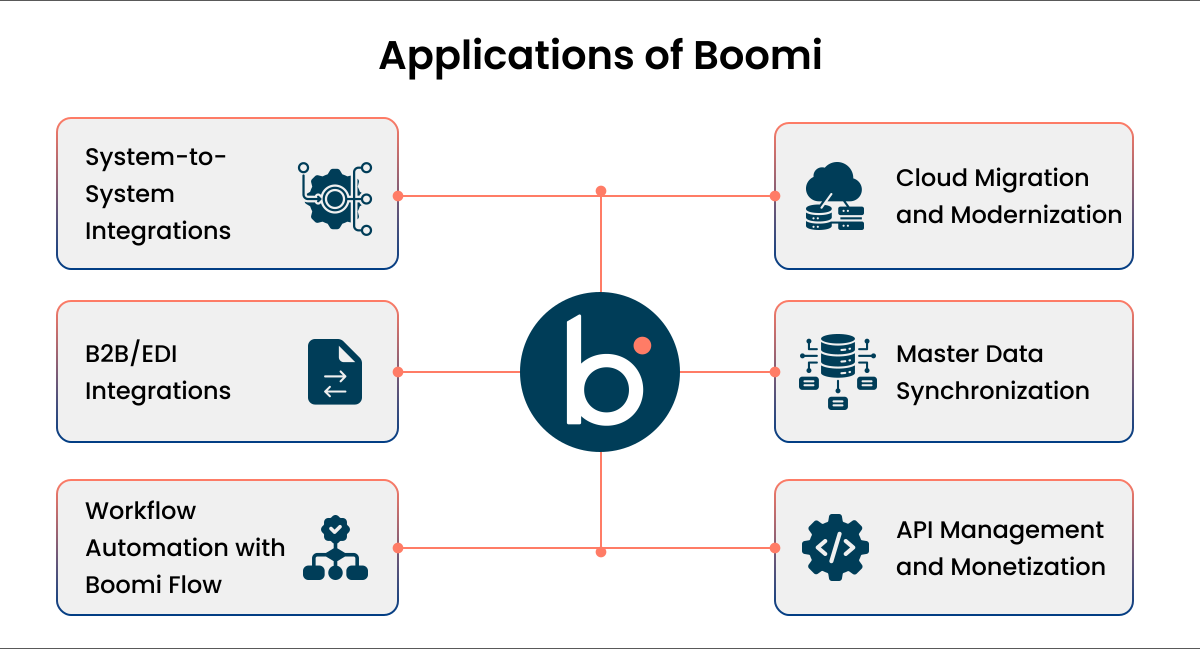
Applications of Boomi
Boomi’s integration capabilities extend across various enterprise scenarios, enabling businesses to streamline processes, enhance data accuracy, and improve operational agility. Below are some of the most common and impactful use cases of the Boomi Integration Platform.
1. System-to-System Integrations
Boomi facilitates seamless communication between enterprise systems, including ERP (Enterprise Resource Planning), CRM (Customer Relationship Management), and HCM (Human Capital Management) platforms. For instance, syncing customer records from Salesforce CRM to NetSuite ERP ensures consistency and reduces manual entry errors.
Common system-to-system integrations include:
- Salesforce with SAP or Oracle
- NetSuite with Shopify or Magento
- Workday with Active Directory and payroll systems
These integrations ensure that business-critical applications share data accurately, enabling informed decision-making and improved service delivery.
2. Cloud Migration and Modernization
As organizations transition from legacy systems to modern cloud platforms, Boomi serves as a bridge to migrate data, applications, and processes. It supports both phased and real-time migration strategies and includes built-in data validation and rollback mechanisms.
Examples include:
- Migrating legacy HR systems to Workday
- Transitioning from on-prem CRM to Salesforce
- Moving databases to cloud-native platforms like AWS RDS or Azure SQL
Boomi simplifies modernization by abstracting complexity and providing tooling for data cleansing, mapping, and transformation.
3. B2B/EDI Integrations
Boomi supports EDI standards, including ANSI X12 and EDIFACT, enabling businesses to connect with suppliers, customers, and trading partners. The Boomi B2B/EDI Management component streamlines the setup, mapping, and monitoring of B2B transactions.
Key use cases:
- Purchase Order and Invoice exchange between retailers and suppliers
- Shipping notices and logistics tracking
- Integration with marketplaces such as Amazon or eBay
Boomi also enables secure transport using protocols such as AS2, FTP, and HTTPS.
4. Master Data Synchronization
Inaccurate or inconsistent master data (e.g., customer, product, supplier) leads to inefficiencies and reporting errors. Boomi helps synchronize master data across systems in real-time or on a scheduled basis, ensuring a single source of truth.
Using Boomi DataHub (formerly Master Data Hub), organizations can define golden records, apply data quality rules, and manage updates through data stewardship workflows.
5. Workflow Automation with Boomi Flow
Boomi Flow enables users to design and deploy business workflows, including approval processes, service requests, and form submissions. It integrates tightly with Boomi Integration to execute background data operations while presenting user-facing interfaces.
Common workflow scenarios:
- Employee onboarding
- Leave request approvals
- Customer service case routing
Flow applications can be embedded in portals or mobile apps, or run as standalone web applications.
6. API Management and Monetization
With Boomi API Management, enterprises can design, publish, and manage REST and SOAP APIs. Boomi offers features such as throttling, version control, access tokens, and monitoring, making it easier to expose internal services to external consumers.
Use cases include:
- Publishing APIs for partner or third-party use
- Building a secure API layer for mobile apps
- Exposing legacy systems via modern RESTful APIs
Boomi’s built-in API Gateway helps enforce security policies and manage traffic to ensure reliable and governed access to services.
7. Agentic Automation
A growing set of use cases puts AI agents on top of existing integrations. Because Boomi already holds governed connections to ERP, CRM, and service systems, an agent built in AgentStudio can act on that data without new point-to-point access.
Common early scenarios:
- Support case triage with automatic updates to CRM records
- Order and invoice exception handling that checks ERP data before routing to a person
- Employee self-service that answers policy questions and opens HR or IT requests
Our Boomi iPaaS Success Stories
Explore how we use Boomi iPaaS across industries to deliver seamless integrations, accelerate platform migrations, and automate EDI-driven business processes. Each success story highlights our hands-on Boomi expertise in solving complex data challenges, enabling reliable system connectivity, and driving measurable operational impact.
Click on our client’s logo below to learn more about each success story.
 |
 |
 |
 |
 |
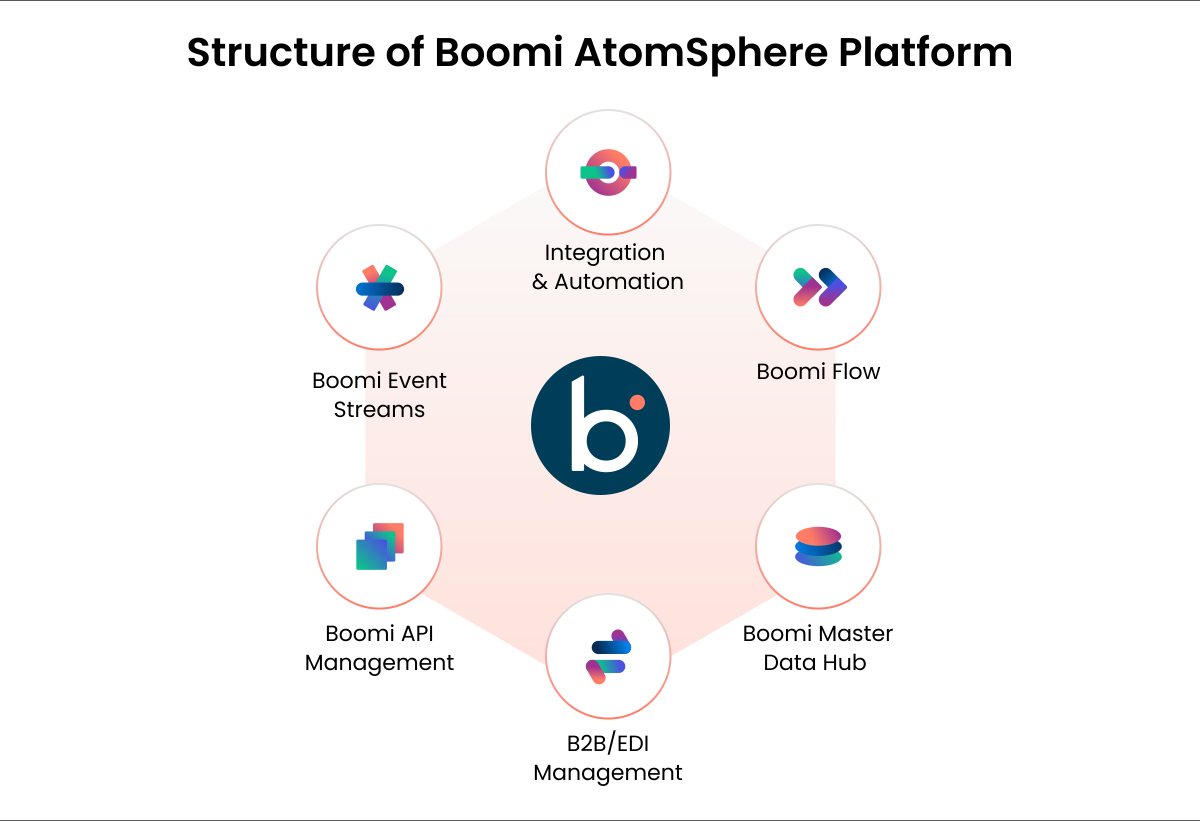
Structure of Boomi AtomSphere Platform
AtomSphere was the original name of the platform that runs all of Boomi’s services. Boomi now markets it as the Boomi Enterprise Platform, although the documentation site and many developers still use the AtomSphere name, so you will see both. The platform provides one interface for building, deploying, and managing integrations, APIs, workflows, data governance, and AI agents. It is modular, so organizations can license only the components they need and add others as requirements grow.
1. Boomi Integration
This is the platform’s foundational module, enabling the development and deployment of integration processes. It handles:
- Application connectivity (cloud, on-premises, hybrid)
- Data mapping and transformation
- Orchestration and process flow logic
- Secure execution via Boomi Atoms and Molecules
The Integration module is used for most use cases, including ERP-CRM syncs, data migration, and cross-application data pipelines.
2. Boomi Flow
Boomi Flow enables the design of user-centric workflows and applications through a low-code, drag-and-drop interface. These flows can be embedded in mobile apps or portals, or used as standalone forms.
Flow is commonly used for:
- HR onboarding workflows
- Customer service forms
- Approval processes
Flows integrate seamlessly with backend systems using Boomi Integration, creating a full-stack solution.
3. Boomi DataHub (Formerly Master Data Hub)
This component provides centralized control over master data, including customers, products, vendors, and locations. It enables enterprises to define golden records, detect duplicates, and ensure data consistency across all systems.
Key features include:
- Data stewardship tools for review and approval
- Data quality rules and validation
- Multi-domain and multi-directional synchronization
Boomi Data Hub is critical for organizations seeking a unified view of business-critical data.
4. Boomi B2B/EDI Management
Boomi’s B2B/EDI Management module supports traditional EDI transactions between trading partners. It simplifies:
- Setting up trading partner profiles
- Creating and mapping X12 and EDIFACT documents
- Monitoring B2B transactions
It supports secure transmission protocols like AS2, SFTP, and HTTP, and integrates with ERPs, logistics systems, and marketplaces.
5. Boomi API Management
Boomi’s API Management module lets you create, publish, secure, and monitor APIs. It provides tools for:
- API gateway and proxy management
- Access control via API tokens
- Rate limiting and throttling
- Versioning and lifecycle management
Boomi strengthened this module in 2024 by acquiring APIIDA’s federated API management business, which adds an API control plane for governing APIs across multiple gateways, and the Mashery API management business from Cloud Software Group. API Management can also expose APIs as MCP server endpoints, so AI agents call them under the same security policies as any other consumer.
6. Boomi Event Streams
This is Boomi’s event-driven architecture component, enabling real-time communication between systems using pub/sub models. It supports:
- Event hubs and stream-based processing
- Integration with Kafka and message queues
- Microservice-based architectures
Boomi Event Streams is essential for modern applications that rely on real-time data pipelines.
7. Boomi Data Integration
Boomi Data Integration is the former Rivery platform, acquired in December 2024. It runs ELT pipelines, change data capture, and reverse ETL, moving data from databases and applications into warehouses such as Snowflake, Redshift, and BigQuery and sending enriched data back to business applications.
8. Boomi Managed File Transfer
Built on Thru, acquired in 2025, Managed File Transfer handles secure, governed file exchange with partners and regulated parties alongside API and EDI traffic on the same platform.
9. Boomi Agentstudio
AgentStudio is the platform’s layer for designing, deploying, and governing AI agents. Section 3.10 covers how it works.
Recent Boomi Acquisitions
Boomi continues to expand its platform capabilities through strategic acquisitions that enhance its data, automation, and connectivity offerings. The most significant recent acquisitions include:
- APIIDA and Mashery (2024): APIIDA’s federated API management business and the Mashery API management business from Cloud Software Group, which expanded Boomi API Management with a multi-gateway control plane and an enterprise-scale gateway.
- Rivery (December 2024, now Boomi Data Integration): A SaaS-based data integration platform focused on ETL and data orchestration for analytics. The acquisition of Rivery enhances Boomi’s ability to support modern data stacks, enabling businesses to move and transform large datasets from diverse sources into data warehouses such as Snowflake, Redshift, and BigQuery.
- Thru, Inc. (2025, now Boomi Managed File Transfer): A cloud-native Managed File Transfer (MFT) solution provider, Thru strengthens Boomi’s B2B and large-scale file integration capabilities. It allows secure, scalable, and reliable file-based workflows that complement Boomi’s integration and API services.
6. Different Ways to Integrate Using Boomi
Boomi supports various integration methods, ensuring flexibility and adaptability in any enterprise environment, whether cloud-only, on-premises, or hybrid. The platform’s architecture, tools, and deployment options provide multiple pathways for achieving integration outcomes tailored to business needs, system constraints, and IT strategy.
1. Prebuilt Connectors
Boomi’s extensive library of prebuilt connectors is one of its biggest strengths. These connectors support integration with hundreds of applications, including Salesforce, SAP, NetSuite, Microsoft Dynamics, Workday, and AWS services. Using these connectors minimizes development effort, accelerates time-to-value, and ensures reliable communication with third-party systems.
These connectors are not just simple adapters. They support intelligent connection logic, error handling, authentication, pagination, and rate limiting out of the box. Integration developers can plug these into a workflow and focus on logic instead of low-level details.
2. AI-Guided Integration
Boomi’s use of artificial intelligence, primarily through Boomi Suggest and community-driven intelligence, enhances integration speed and accuracy. Boomi Suggest provides intelligent recommendations for field mappings and process structures, leveraging anonymized data from previous successful implementations.
This feature is particularly helpful for new users or less experienced developers, ensuring consistency across enterprise-wide projects.
3. Hybrid Integration Scenarios
Boomi offers significant flexibility in terms of deployment options:
- Cloud to Cloud: Ideal for organizations using SaaS platforms such as Salesforce, NetSuite, and Workday. All integration processes run within Boomi Atom Clouds.
- On-Premises to Cloud: For businesses that operate critical legacy systems on-premises but need to integrate them with modern cloud applications. A local Boomi Atom can be deployed to connect securely.
- Cloud to On-Premises: When SaaS applications need to access internal data or services (e.g., a cloud CRM needing customer data from an on-premises database).
- On-Premises to On-Premises: Even if both systems are local, Boomi can act as a reliable middleware to manage orchestration, error handling, and data transformation.
Boomi’s lightweight Atom engine ensures that integrations can run wherever needed, with full control over data movement and process execution.
4. Atom, Molecule, and Private/Public Atom Clouds
- Atom: A standalone runtime deployed on any machine. It’s lightweight and ideal for single-instance use cases.
- Molecule: A cluster of Atoms that provides scalability and load balancing. Best suited for high-throughput, mission-critical environments.
- Private Atom Cloud: A self-managed environment hosted in a private cloud or data center, offering cloud-native execution with enterprise control.
- Public Atom Cloud: Managed by Boomi, this shared cloud environment lets organizations run integrations without maintaining their own infrastructure.
These deployment modes let enterprises choose the one that best suits their compliance, performance, and operational needs.
5. API-Led Integration
Boomi’s API capabilities support an API-first integration strategy. Developers can:
- Expose Boomi processes as REST or SOAP APIs
- Use API Gateway to manage access and versioning
- Apply throttling and security policies
- Expose APIs as MCP tools that AI agents can discover and call
This method of integration is helpful for:
- Enabling mobile or web applications to interact with backend systems
- Sharing data with partners via managed APIs
- Creating composable services in a microservices architecture
- Giving AI agents governed access to enterprise systems
Boomi’s design tools make it easy to develop API endpoints with minimal coding, aligning well with enterprise strategies focused on agility and reuse.
Advantages of Boomi
Boomi offers many benefits for enterprises seeking to modernize their integration strategy. Its cloud-native architecture, pre-built components, scalability, and ease of use make it suitable for organizations of all sizes and industries.
1. Accelerated Time-to-Market
One of Boomi’s most prominent advantages is how quickly organizations can design, build, and deploy integrations. With reusable components, drag-and-drop tools, and AI-assisted data mapping, development cycles are significantly shortened. Businesses can respond faster to market needs and internal transformation initiatives.
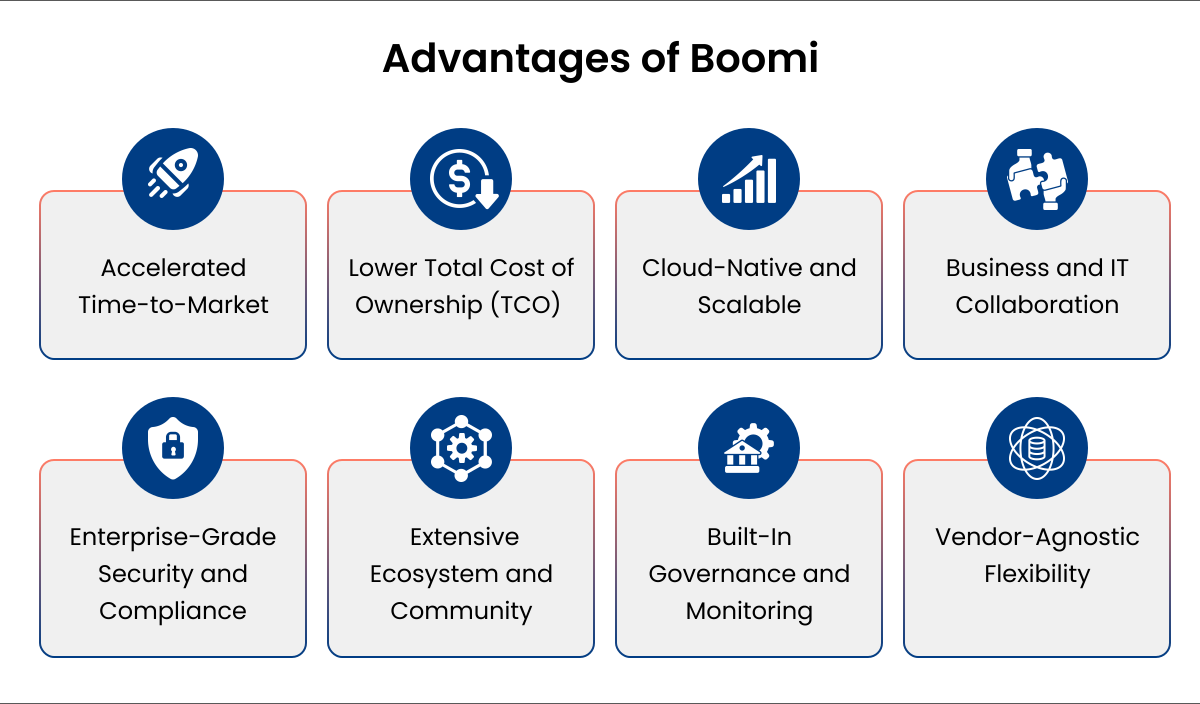
2. Lower Total Cost of Ownership (TCO)
Boomi’s low-code environment and hosted infrastructure reduce the need for extensive coding resources and hardware investments. The platform supports reuse across projects, decreasing duplicate effort and minimizing ongoing maintenance costs.
Cost savings come from:
- Reduced development time
- Fewer integration errors
- Minimized infrastructure management
- A published pay-as-you-go entry plan alongside quote-based annual editions
3. Cloud-Native and Scalable
Designed from the ground up for the cloud, Boomi scales with enterprise needs. Whether deploying a single integration or managing thousands, Boomi handles increasing load without a drop in performance. The platform can operate in hybrid, multi-cloud, or on-prem configurations, supporting diverse IT environments.
4. Business and IT Collaboration
Boomi’s user-friendly interface and intuitive design encourage collaboration between business analysts and technical teams. Business users can review or even build basic flows, while developers handle complex integrations. This democratization of integration promotes faster delivery and stakeholder buy-in.
5. Enterprise-Grade Security and Compliance
Security is built into every layer of Boomi’s platform. Key capabilities include:
- Role-based access control
- Secure token exchange
- End-to-end encryption
- Audit trails and compliance logging
- SOC 2 and ISO 27001 certifications
Boomi is trusted by large financial institutions, healthcare providers, and government agencies to manage critical integrations.
6. Extensive Ecosystem and Community
Boomi has built a strong ecosystem of partners, certified developers, and community contributors. The Boomi Community portal features:
- Forums for peer support
- A Process Library of reusable templates
- Product documentation and release notes
- Access to Boomi Suggest and best practices
7. Built-In Governance and Monitoring
The platform’s centralized monitoring dashboard ensures visibility into integration health, API consumption, and workflow status. Alerts, logs, and analytics allow teams to identify and address issues proactively.
For enterprises operating in regulated industries, this transparency supports effective governance, compliance, and audit readiness.
8. Vendor-Agnostic Flexibility
Boomi connects to virtually any system, regardless of vendor, deployment model, or data format. This makes it especially attractive to enterprises seeking to:
- Modernize legacy systems
- Avoid vendor lock-in
- Maintain interoperability across cloud and on-prem
Why Choose Boomi Integration Platform?
Choosing the right iPaaS solution is a strategic decision that impacts a company’s integration agility, IT scalability, and digital transformation journey. Boomi offers a compelling set of differentiators that make it a leading choice for enterprises worldwide.
Competitive Differentiators
Boomi’s key strengths include its low-code development environment, robust prebuilt connectors, cloud-native architecture, and unmatched usability. These features provide a significant edge over competitors in the iPaaS space, such as MuleSoft, SnapLogic, Workato, and Informatica.
Let’s examine how Boomi compares with some of these platforms:
| Feature | Boomi | MuleSoft | SnapLogic | Workato |
| Usability | Intuitive, highly visual, low-code UI for all users | Moderate – more technical & developer-focused | Easy-to-use visual builder | Designed for business users; no-code friendly |
| Connector Library | Prebuilt connectors for 1,000+ enterprise applications across SaaS, cloud, legacy | Smaller library; strong API-first support | Good set with modern app focus | Moderate set of connectors |
| Community & Templates | Large community, Process Library, Boomi Suggest | Strong Salesforce ecosystem (Trailblazer) | Medium-sized community | Smaller community |
| Deployment Flexibility | Cloud, hybrid, on-prem, Atom/Molecule | Hybrid with control plane | Cloud-based | Cloud-hosted, with an on-prem agent for local systems |
| API Management | Strong, with built-in API Gateway and federated multi-gateway control | Very strong (Anypoint Platform) | Available features | Available with limitations |
| AI Capabilities | AgentStudio for AI agents, Boomi Companion for natural-language development, MCP support, built-in platform agents, Boomi Suggest | MCP support and Agent Fabric for governing AI agents | SnapLogic Iris and AgentCreator, with MCP support | Agent Studio and Genies, with Enterprise MCP |
Each platform has a clear sweet spot. MuleSoft suits API-first programs, especially in Salesforce-heavy estates. Workato suits business-led automation. SnapLogic suits data-pipeline-heavy teams. Boomi tends to fit best where hybrid deployment, B2B/EDI, and a broad mix of SaaS and legacy systems all matter at once.
Boomi Suggest and Community-Driven Intelligence
Boomi Suggest is a unique AI-powered tool that recommends mappings and integration paths by analyzing a vast repository of successful integrations built by other Boomi users. This crowdsourced intelligence helps developers avoid common pitfalls and leverage best practices, speeding up development and improving process quality.
Boomi also offers:
- Boomi Community: Forums, solution exchanges, and knowledge bases.
- Boomiverse: Central hub for documentation, learning paths, certification, and process sharing.
Industry Recognition
Boomi was named a Leader in the 2026 Gartner Magic Quadrant for Integration Platform as a Service for the 12th time and positioned highest for Ability to Execute. Boomi reports more than 30,000 customers worldwide, including global enterprises in finance, retail, manufacturing, healthcare, and government.
Industry leaders appreciate Boomi’s agility, extensibility, and vendor neutrality. It adapts to both centralized and federated integration models, offering options for IT-led, business-led, or hybrid governance approaches.
ROI and Business Impact
Organizations that adopt Boomi typically realize quick ROI through shorter development cycles, faster application onboarding, and improved data accuracy. Boomi helps reduce integration backlog, streamline internal operations, and accelerate innovation by allowing teams to focus on business logic rather than technical plumbing.
The gains teams most often report fall into three areas:
- Shorter build cycles, because prebuilt connectors and reusable components replace hand-coded integrations
- Time-to-integration shrinks from months to weeks or even days
- Maintenance effort drops due to standardization and reuse
How Much Does Boomi Cost?
Boomi publishes one price. Its Pay-As-You-Go plan costs $99 a month plus $0.05 per Boomi Message, billed monthly with no contract, and includes the full Boomi Enterprise Platform with Standard support. Boomi’s FAQ currently limits this plan to users who opt in during the free trial, so confirm eligibility before you plan around it.
Boomi’s sales team quotes annual subscription editions for Integration, API Management, DataHub, and Data Integration. The final price depends on:
- The products and edition you license
- Connectors or message volume, environments, and users
- Add-ons and support level
- Implementation and managed services from a partner
A 30-day free trial gives you access to the full platform, the simplest way to test a pilot integration before committing. If you need a realistic estimate for your environment, talk to our Boomi architects.
Top Boomi Integration Scenarios
Boomi’s flexibility lets it meet diverse integration needs across industries. Below are Boomi use cases that demonstrate its real-world application and impact.
1. Salesforce + NetSuite Integration
Many enterprises need to bridge the gap between CRM (Salesforce) and ERP (NetSuite) systems. Boomi enables real-time data synchronization between leads, opportunities, customer records, invoices, and financials.
Benefits:
- Sales and finance teams operate with the same data
- Automation of the quote-to-cash process
- Reduced errors and manual data entry
2. SAP + eCommerce Platform Sync
Retailers using SAP for inventory and finance can integrate it with platforms like Shopify or Magento using Boomi.
Benefits:
- Real-time inventory visibility
- Automatic order updates in SAP
- Unified customer experience across sales channels
3. HR Onboarding Automation
Boomi Flow, combined with Boomi Integration, enables automated onboarding across multiple systems, including Workday, Active Directory, Microsoft 365, and payroll platforms.
Workflow example:
- HR submits new hire details
- User accounts created in Active Directory
- Welcome email sent with login credentials
- Access granted to required tools and apps
4. Legacy System Modernization
Many businesses operate critical legacy applications that cannot be decommissioned. Boomi wraps these applications with REST APIs, enabling modern systems to access them without full replacement.
Benefits:
- Extends the life of legacy systems
- Enables cloud or mobile access
- Avoids high migration costs
5. Customer 360 Across Departments
Boomi connects CRM, support, marketing, billing, and analytics systems to provide a unified view of the customer.
Benefits:
- Improved customer service
- Better segmentation and targeting
- Enhanced sales and upsell opportunities
6. Real-Time Analytics and Reporting
Boomi feeds transactional data into analytics platforms like Snowflake, Power BI, or Tableau. It extracts, transforms, and loads (ETL) data from operational systems in near real time.
Benefits:
- Better decision-making with up-to-date insights
- Elimination of data silos
- More accurate reporting and compliance
Our Boomi Integration Use Cases Across Different Platforms
See how we connect Boomi with platforms such as Salesforce, NetSuite, and other enterprise applications to create seamless data flows and automated workflows. Each use case demonstrates how the right integration approach removes silos, improves accuracy, and supports scalable operations.
Click on our client’s logo below to learn more about each case study.
 |
 |
 |
 |
 |
NeosAlpha’s Boomi Services
NeosAlpha is a trusted Boomi Gold Partner and a 4-time Boomi award winner, specializing in providing end-to-end services around the Boomi Integration Platform. This empowers enterprises to modernize, automate, and scale with confidence. Our approach is anchored in deep platform expertise, industry-aligned best practices, and a commitment to delivering measurable business outcomes. . Our Boomi teams support clients across the UK, US, India, and Australia.
1. End-to-End Boomi Implementation
We offer full-lifecycle implementation services, from requirement gathering and architecture design to development, testing, deployment, and post-go-live support. Our certified consultants ensure your Boomi projects are aligned with both IT and business goals.
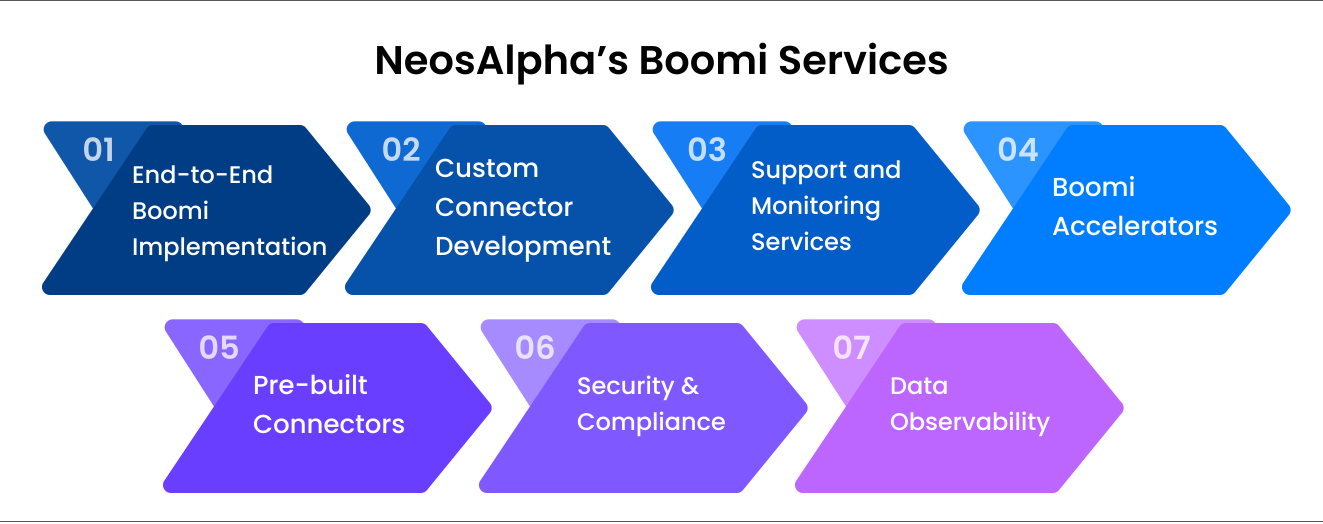
2. Custom Connector Development
For enterprises working with niche or proprietary applications, we build and maintain custom Boomi connectors. These connectors are robust, secure, and reusable, making it easier to extend Boomi’s capabilities into your ecosystem.
3. Support and Monitoring Services
We offer managed services to monitor, maintain, and optimize Boomi integrations. This includes:
- 24/7 process monitoring
- SLA-based incident resolution
- Regular performance audits
- Platform upgrade assistance
4. Boomi Accelerators
Our prebuilt Boomi accelerators help clients go live faster. These include:
- Salesforce–NetSuite integration packs
- SAP-eCommerce starter templates
- HR onboarding automation kits
5. Case Studies and Success Stories
We’ve helped global clients achieve impactful results with Boomi:
- A UK-based retailer reduced manual processing by 60% by automating order-to-cash workflows
- A healthcare provider improved patient onboarding by integrating EHR and scheduling systems in just 3 weeks
- A manufacturing enterprise modernized its partner onboarding using Boomi B2B/EDI, cutting onboarding time by 40%
6. Boomi Hosting and Managed Services
We offer hosting options for private Atom Clouds in Azure, AWS, or customer-owned infrastructure. Our Boomi managed services team handles:
- Infrastructure provisioning
- Security patching
- Backup and disaster recovery
- Compliance monitoring
7. Strategic Boomi Consulting
Whether you’re planning a new integration initiative or optimizing an existing one, our Boomi architects offer strategic guidance around:
- API-first design
- Event-driven architectures
- Master data governance
- Cloud migration planning
- Agentic AI on Boomi, including AgentStudio agents and MCP-enabled APIs
8. Boomi Companion Enablement
Boomi Companion can speed up delivery, but only with the right setup and review discipline. We help client teams adopt it safely:
- Installing and configuring Companion plugins in the AI tools your team already uses
- Setting up Platform API access with least-privilege roles and clear environment boundaries
- Defining review standards so AI-built processes pass the same quality gates as hand-built ones
- Using Companion to accelerate new integrations, DataHub work, and AgentStudio agents
Conclusion
Boomi is not just a tool – it is a platform that helps organizations unlock agility, efficiency, and innovation. With its low-code interface, extensive connector library, support for hybrid deployments, and AI capabilities that now range from Boomi Suggest to AgentStudio, the platform empowers both IT and business users to build reliable, scalable integrations.
From automating business processes and accelerating digital transformation to enabling real-time analytics and API-led strategies, Boomi supports a wide range of enterprise use cases. Its modular Boomi Enterprise Platform lets companies start small and scale as they grow, adapting to both legacy and modern cloud environments.
For enterprises seeking to simplify complex integration challenges, reduce operational costs, and deliver a seamless experience across systems, Boomi is a future-ready platform that provides real value.
At NeosAlpha, we help organizations navigate their Boomi integration journey, providing strategy, implementation, support, and innovation every step of the way. Whether you’re evaluating Boomi for the first time or looking to optimize your current setup, we’re here to help you succeed. Book a free consultation with our Boomi architects to map your next step.