Ever wondered what sets industry leaders apart in integration and automation? The answer lies in the intelligent use and deployment of AI Agents to address issues such as complex workflows, sprawling data, and tight timelines. AI Agents are becoming essential to integration strategy. According to PwC, 70% of companies have started adopting AI agents, and two-thirds of them reported measurable gains in productivity, cost savings, decision speed, and customer satisfaction. Additionally, Master of Code suggests that by 2027, AI agents will automate 15-50% of routine business tasks, freeing resources and letting other teams focus on strategic work.
With Boomi, you have three ways to put agents to work: build custom agents tailored to your processes, activate pre-built agents within the platform, or deploy production-ready agents from the Boomi Marketplace. Where should you begin? As Boomi’s Ed Macosky puts it:
“I tell them to first focus on the opportunity that you believe AI can help you with and work backwards from there to the technology.”
In this blog, we will explore how Boomi AI Agents are transforming automation, how they work, and how we help you unlock their true potential.
What are Boomi AI Agents?
Boomi AI Agents are software components that run within the Boomi enterprise platform and perform integration and automation tasks with specific objectives. Boomi describes this simply: create fully custom agents using a no-code approach, utilize pre-built agents within the platform from day one, or deploy production-ready agents from the Boomi Marketplace. All of these operate centrally while remaining connected to your enterprise data.
This last point is what sets Boomi apart. Because these agents operate within an integration platform, they can access and interact with every application and data source connected to Boomi. An agent doesn’t just answer questions in isolation; it designs integrations, maps data, generates documentation, and classifies sensitive records. It does all this using the systems that drive your business, while letting you use natural language prompts instead of manual coding.
You create and manage custom agents using Boomi AgentStudio, a comprehensive solution within the platform dedicated to the agent lifecycle. In addition to AgentStudio, there are three other key components that guide the agent from initial creation through to production management:
- Agent Designer: A no-code and low-code workspace for building custom agents. Teams can start from scratch or use over 100 templates, connect agents to data and system actions, refine model behavior, and implement necessary safety rules (guardrails) before deployment.
- Agent Garden: This is the orchestration and management layer. It provides a unified interface to organize, deploy, and interact with agents, and offers REST APIs to trigger deployments from external systems and utilize active agents.
- Agent Control Tower: This is the governance layer. It enables centralized oversight of all agents, monitors performance and risk in near real time, manages API connections, and enforces the security and compliance controls companies require before agents use live data.
Use Pre-Built Agents Embedded in Boomi
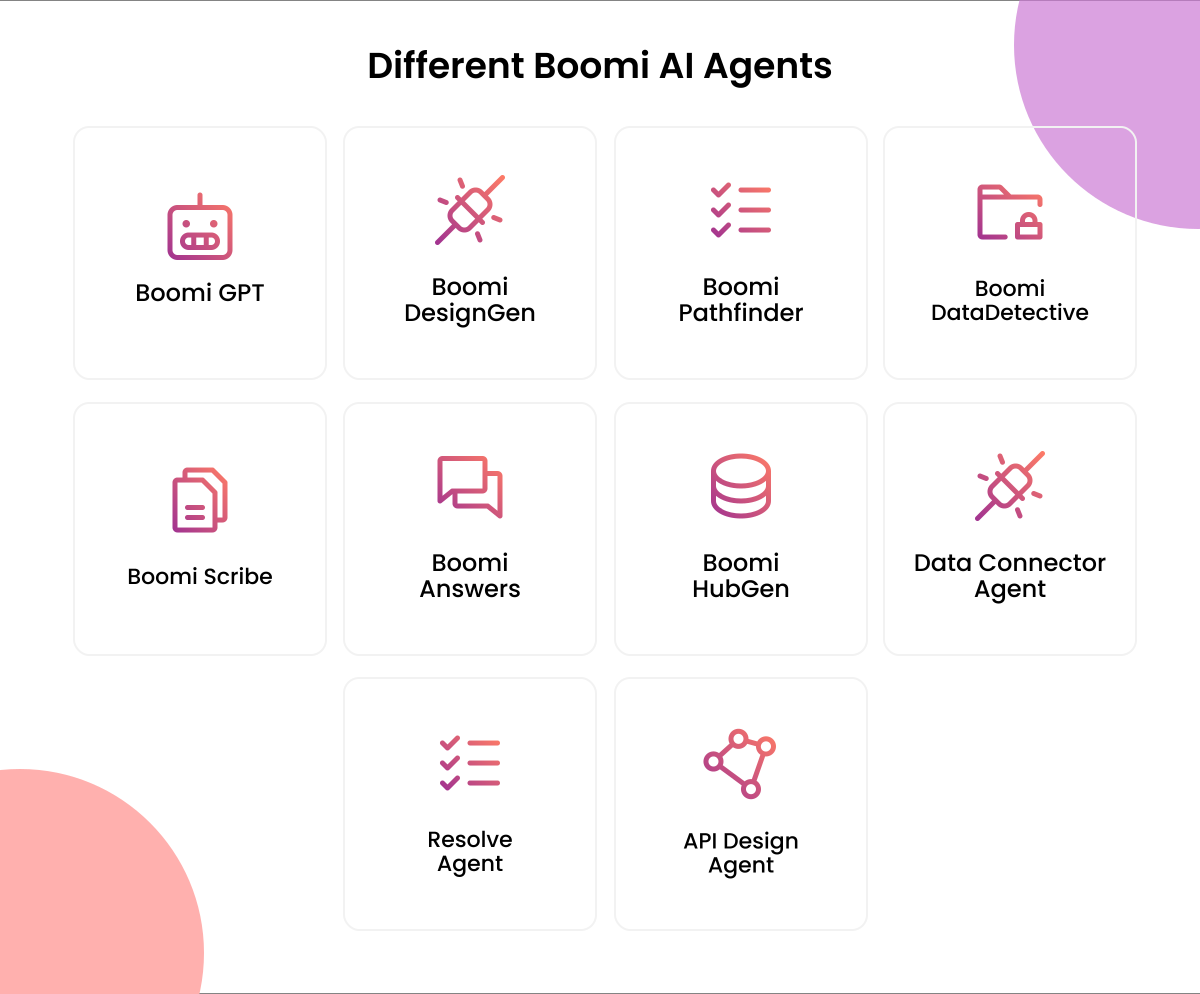
Leverage the growing collection of Boomi-built AI agents integrated directly into the Boomi Enterprise Platform. These agents help developers accelerate integration and automation from day one. They come pre-installed at no extra cost, and each agent is trained to handle a specific part of the integration lifecycle, such as designing processes, writing documentation, or securing sensitive data. You don’t need to build them; simply put them to work.
- Boomi GPT: A conversational interface for Boomi AI. You enter prompts in natural language, and Boomi GPT orchestrates the appropriate agents such as DesignGen, Answers, Scribe, and HubGen to execute tasks and deliver results.
- Boomi DesignGen: Designs integration processes from natural language prompts by leveraging over 300 million integration patterns and best practices. It then allows you to refine the generated design to suit your specific requirements.
- Boomi Answers: Provides instant support. It answers questions about the Boomi Enterprise Platform using information from Help.Boomi.com and the Boomi Community, helping you build expertise as you work.
- Boomi Scribe: Automatically generates documentation for existing and new integration processes, eliminating the manual effort required to explain what each process does and why.
- Boomi DataDetective: Safeguards sensitive information by using AI to classify data and track its movement across regions. It analyzes field and step metadata, not actual data values, to identify PII and ensure regulatory compliance.
- Boomi Pathfinder: Guides you on the next best steps as you build integrations. It offers automated data mapping, reusable building blocks, and patented recommendations to optimize your workflows.
- Boomi HubGen: Drafts Master Data Hub models based on your data synchronization goals. It simplifies data synchronization and improves data quality by consolidating disparate sources into a single source of truth. (Requires Boomi DataHub.)
- Boomi Resolve: Resolves integration process errors by leveraging solutions found in Boomi documentation and community articles. This reduces the time between error detection and resolution, thereby enhancing operational efficiency. Integration Advisor Agent: It automatically reviews your integration process and offers suggestions based on Boomi best practices. It identifies areas to improve performance and long-term maintainability.
- API Design Agent: It generates OpenAPI specifications for your APIs. It speeds up API design by turning requirements into a structured, standards-based specification you can refine and publish.
- API Documentation Agent: It automatically creates clear and easy-to-understand documentation for your APIs. This enables users to understand how to use each endpoint without requiring technical writing expertise.
- Data Connector Agent: It helps connect and ingest data sources into your integration and data workflows, making new data available for automation quickly.

Boomi AI Agents Integration: Three ways to adopt
So, how can you actually use Boomi AI agents in your business? Boomi doesn’t limit you to just one approach. If your business has a unique integration process, you can build a custom agent. If you want quick results from your integration tasks, you can use pre-built agents. If you want to reach production quickly without building everything from scratch, you can acquire ready-made agents from the marketplace. All three options remain connected to your enterprise data from the very start. Let’s explore how each one works.
1. Build custom agents tailored to your business
When your process doesn’t fit a standard template, you can build your own agent. Boomi Agentstudio allows you to design and deploy fully custom, goal-oriented agents using a ‘no-code agent designer.’ You can start from scratch, use a template, or leverage AI to build the agent; then, connect it to trusted data and implement guardrails. This covers the entire lifecycle, from design and management to large-scale orchestration.
2. Use pre-built AI agents in Boomi
Sometimes, the fastest solution is an agent that already exists on your platform. Boomi platform agents run within the enterprise platform and automate integration and platform tasks without requiring custom development or additional costs. They come pre-installed and ready for immediate use. Trained on over 300 million integration patterns, they empower your team to rapidly design, document, and troubleshoot integrations from day one.
3. Deploy production-ready agents
When you need to move fast without building from scratch, the Boomi Marketplace offers a shortcut. Choose ready-made agents and agentic workflows from Boomi and trusted partners, then deploy them into production for a rapid ROI. These configurable, enterprise-ready agents bridge the gap between a great idea and a live, production-ready agent.
How Boomi AI Agents Integrate With Enterprise Applications
Enterprises don’t run on a single, neat, tidy system. You have CRMs, ERPs, various databases, LLM models, support platforms, and years of accumulated integrations connecting them all. So, the real question isn’t whether an AI agent sounds smart; it’s whether that agent can operate securely within your existing systems without requiring a rebuild. With Boomi, this is possible because the agent utilizes the very connections your business already relies on.
Consider a typical request your teams handle daily: “Where is my order, and when will it arrive?” Instead of a person opening the CRM, then the ERP, and finally the shipping system, a Boomi-connected agent completes the task in one go. It reads the customer record in your CRM, checks the order fulfillment status in your ERP, and answers directly. A process that once bounced between three teams now completes in seconds, using your live data.
The agent accomplishes this by using tools provided by Boomi to access your system stack:
- Your CRM (Salesforce, Dynamics, HubSpot): View and act upon a customer, opportunity, or case.
- Your ERP (SAP, Oracle, NetSuite): Retrieve a record or initiate an approved process within your defined rules.
- Your Data Platforms (Snowflake, Databricks, Boomi Data Hub): Query trusted data and use that information to fulfill requests.
This component is critical for any company. The agent accesses these systems via your existing Boomi connections, which already incorporate your authentication, access control, and audit logging capabilities. The agent can only perform actions permitted for the user, and it maintains a record of every action. You gain the speed of automation while retaining control over your systems.
Real-world Use of Boomi AI Agents: Some Examples
We have discussed how it works; now let’s look at what it looks like when companies deploy Boomi AI agents to solve actual business problems.
Use Case 1: Automating Financial Operations at a Legal Services Firm
Industry: Legal and Litigation Services
Problem: Processing payments from credit card files, ACH transfers, and remittances and reconciling them with invoices was largely a manual task. It tied up the entire accounting team and slowed down data entry into the ERP system.
Solution: An AI agent managed via Boomi AgentStudio extracts and organizes data from PDFs, spreadsheets, images, and email attachments. It then matches payments to invoices and posts records directly into NetSuite. Human oversight is maintained before final posting, ensuring strict controls over sensitive financial data.
Result: Agents now handle approximately 46% of the process, with about 30% being fully automated. This has improved accuracy and accelerated issue resolution within finance operations.
Use Case 2: Self-healing Integrations at a Pharmaceutical Company
Industry: Pharmaceuticals and Life Sciences
Problem: The integration team operated reactively, manually checking logs and fixing errors only after problems arose. This disrupted business users’ workflows, extended resolution times, and put SLAs at risk.
Solution: A 24/7 autonomous agent built on Boomi Agent Studio detects integration issues, diagnoses them, and resolves them automatically. This shifts the architecture from a constant “firefighting” mode (reactive problem-solving) to a self-healing model, governed and monitored via the Agent Control Tower.
Result: Error detection time dropped from approximately 30 minutes to under two minutes. Mean Time to Repair (MTTR) decreased by 75%, error detection capability improved by 93%, and SLA compliance rose from 85% to 98%.
Use Case 3: Smart Cross-Selling for Sales Organizations
Industry: Enterprise Sales and Revenue Operations
Problem: Sales representatives struggled to identify cross-selling opportunities because signals were scattered across disparate sources such as product usage data, case studies, enterprise applications, and external market events, with no centralized hub for accessing this information.
Solution: An AI agent embedded in enterprise applications lets sales representatives ask in plain language what opportunities exist for a specific customer and how best to approach them. In the background, Boomi aggregates internal and external data sources to generate personalized, data-driven recommendations.
Result: Sales teams receive actionable cross-sell insights when they need them, boosting engagement and saving hours of manual research, so they can focus on revenue-generating conversations.
Boomi AI agents are being deployed across finance, healthcare, manufacturing, sales, and other sectors. Contact our sales representatives, and they will share a case study PDF tailored to your industry, showing how companies like yours are leveraging these agents.Want to see what this looks like for your industry?
How NeosAlpha Helps Companies Adopt Boomi AI Agents
As a certified Boomi Gold Partner, NeosAlpha guides companies through the entire journey from defining AI objectives to deploying agents into production. Our experts start by identifying business processes where agents can deliver tangible value, then map the implementation path. Our team builds custom agents within Boomi AgentStudio, activates pre-built platform agents, and deploys production-ready agents by securely connecting them to your CRM, ERP, and data systems. Our Boomi developers manage integrations, guardrails, and governance to ensure your agents operate accurately and in compliance with regulations. From initial use cases to large-scale implementation, we empower organizations to adopt agentic AI with confidence.
Summary
If you came here asking whether Boomi AI agents can actually work inside your business, the answer is yes, and the reason is the platform itself. Boomi is an integration platform first, so an agent does not sit on the sidelines answering questions. It reaches into the systems where your work already happens, takes action, and stays inside the security and audit controls you already enforce. That is the line between an agent that finishes a task and one that only describes it.
You also have a clear way in. Build a custom agent in AgentStudio when your process is one of a kind, switch on the pre-built platform agents for quick wins on integration work, or deploy a production-ready agent from the Marketplace when speed matters more than customization. The enterprises already seeing results, from automating manual finance close to catching integration failures before they spread, did not begin with a grand rollout. They began with one painful, repeatable process and proved the value there.
So the next step isn’t choosing a tool. It is choosing the opportunity. Pick one process that eats hours and repeats often, map what the agent needs to reach and what it can do, and decide who signs off on its actions once it goes live. That first win becomes the template for the next ten.
If you want help finding that first use case and moving it into production safely, NeosAlpha can guide the assessment, build, and governance from start to finish.